
How Taggun Reads Documents
How OCR, NLP, and machine learning combine to turn receipts and invoices into structured data — and how accuracy is measured in practice.
Optical Character Recognition (OCR) converts document images into machine-readable text — but text alone isn't extraction. Taggun layers AI models over OCR to understand what the text means and return structured, ready-to-use fields. This page explains how, and how accuracy works in practice.
From Image to Structured Data
The following is a conceptual processing flow. Internal stages, ordering, and techniques may change and are not part of the API contract:
- Input preparation — the submitted image or PDF is prepared for recognition.
- Text recognition (OCR) — visible document content is converted into machine-readable text.
- Field interpretation — models use context to identify candidate totals, products, dates, merchant details, and tax identifiers. Taggun processes supported documents in 205 languages.
- Data structuring — interpreted values are organised into documented response fields such as line items, subtotals, taxes, and merchant details.
- Optional processing — dates and currencies may be standardised; documented tax-ID format or checksum checks may run where supported; and enabled features such as fraud signals, categorisation, or campaign rules may be evaluated.
- Response — the endpoint returns its documented JSON response shape. See Understanding Your Results for how to read it.
Conceptual flow: image to structured data
This diagram summarises the relationship between a submitted document, recognised text, and a structured API response. It is conceptual: the current endpoint schemas, not labels or values in the artwork, define the public contract.
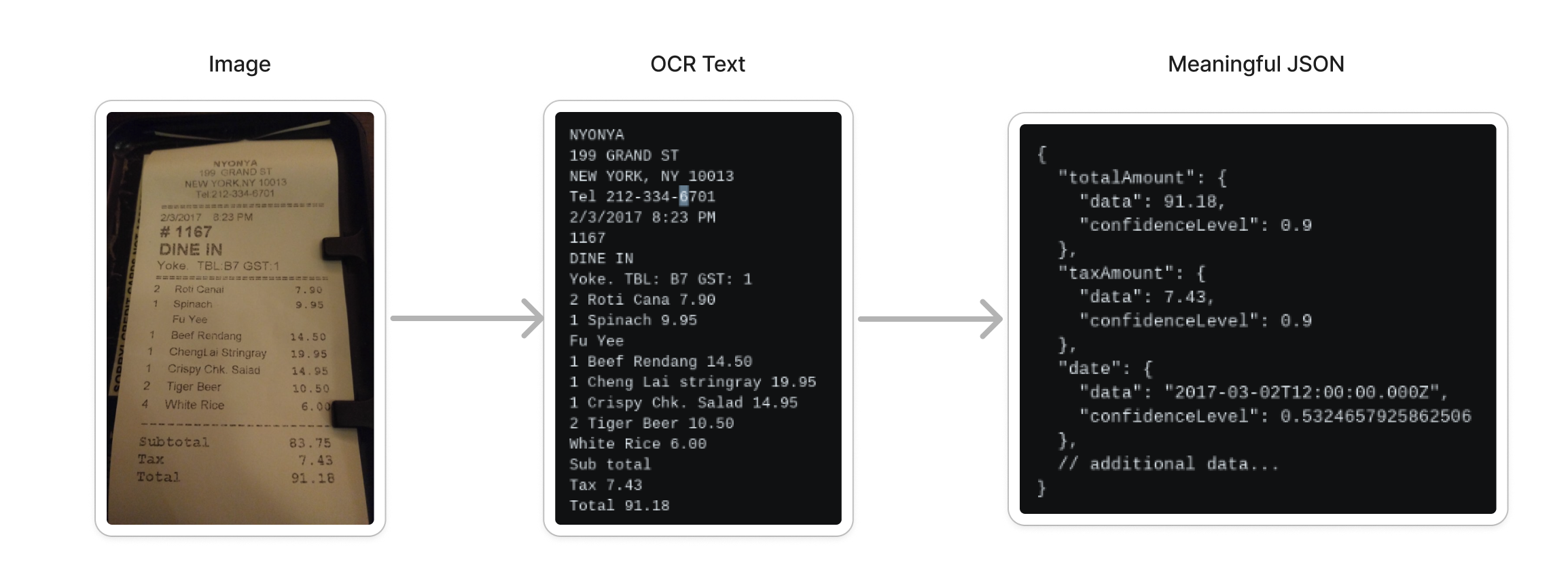
Conceptual document-processing flow; labels and example values in the artwork are illustrative, and endpoint schemas remain the public contract.
Why Receipts Are Hard
Receipts and invoices are among the messiest documents in OCR:
- Endless layout variety — every merchant formats differently, in potentially over 200 languages.
- Poor image quality — crumpled, faded, or badly lit photos from real users.
- Long documents — supermarket receipts with dozens of line items must stay accurate to the last line.
- Ambiguity — is
03/04March or April? Contextual analysis resolves what raw OCR can't. - Handwriting — handwritten elements need dedicated recognition models.
Receipt and Invoice Processing
Taggun processes submitted receipts and invoices and returns the documented extraction fields. If a result is incorrect, follow Contacting Support.
Accuracy in Practice
Taggun processes millions of scans per month at 90%+ accuracy. Two things matter more than any headline number:
- Accuracy is use-case specific. Your document mix — your countries, merchants, and document types — determines your real accuracy. The way to know is to test with your own receipts: see Test With Your Own Receipts. For volume evaluations, we run pilots against your historical documents and share the results for your review.
- Read response metadata in context. See Understanding Your Results.
Customisation & Performance Tuning
Account-specific performance tuning for selected document types is available on Advanced and Enterprise plans. Contact [email protected] to discuss your document set and the options currently available.
Need something not covered here? Contact [email protected] — see Contacting Support.
Updated about 2 months ago