
Understanding Your Results
Decode Taggun's documented extraction responses — data/text/regions, overall and per-field confidence, and simple versus verbose endpoints.
Simple and verbose extraction responses share the data and confidenceLevel pattern. Verbose responses add raw text, location and index metadata, scan metadata, and feature-specific envelopes. This page explains both shapes.
Response Anatomy
Simple response fields contain data and confidenceLevel. On verbose responses, located fields can also contain these properties:
| Property | What it is |
|---|---|
data | The cleaned, standardised value — ready to use directly (e.g. 14.42, "2024-09-25T12:00:00.000Z"). |
text | OCR text associated with the extracted value, when returned (for example, "CP Card 14.42"). It is recognition output, not a pixel-perfect transcription guarantee. |
confidenceLevel | Numeric signal returned for some extracted fields. It is not a calibrated probability or accuracy guarantee. See Confidence Levels below. |
regions | X/Y pixel coordinates of where the data sits on the image — x is distance from the left edge, y from the top. Useful for highlighting fields over the original image. |
index | Numeric index metadata returned with some extracted fields. |
keyword | The matched keyword that anchored the extraction, when applicable (e.g. "IBAN"); "-" when the value wasn't keyword-driven. |
currencyCode | On monetary fields: the detected currency (e.g. USD). |
The response also carries scan-level properties:
| Property | What it is |
|---|---|
confidenceLevel (top level) | Overall confidence for the whole document. |
trackingId | Unique ID returned for the scan. Include it in support requests when returned. |
elapsed | Processing time in milliseconds. |
targetRotation | Numeric image-rotation value returned by processing. |
text.text | The full raw OCR text of the document. |
location | Geolocation context derived from ipAddress (GeoIP). Verbose extraction responses only — stripped from simple and validation responses. Request/user context, not the merchant address. |
For definitions and access paths for the documented public fields, see Data Fields That Taggun Extracts.
Simple vs Verbose
Every extraction input (file upload, URL, encoded file) comes in two flavours:
- Simple — the core fields only: total, tax, date, merchant details, in a compact response.
- Verbose — the broader extraction response schema: detected business fields, line items and helper arrays when returned, per-field metadata, and enabled feature envelopes when applicable.
Rule of thumb: evaluating Taggun? Use verbose. Simple is appropriate when your integration needs only the compact core-field response.
Example Input
The simple and verbose responses below use the same receipt scenario. Keeping the input constant makes the difference between the two response shapes easier to see.
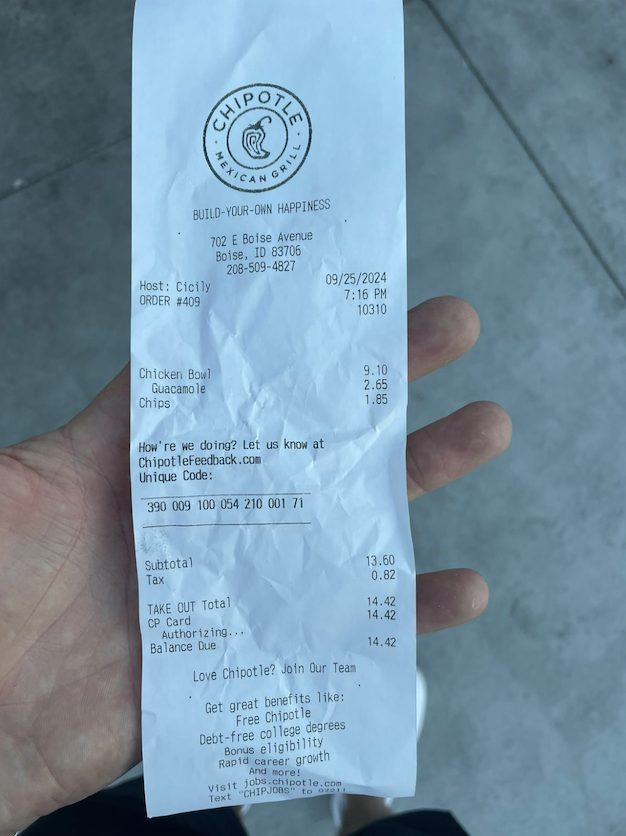
Illustrative receipt accompanying the simple and verbose response walkthroughs.
Example: Simple Response
The canonical simple response (Upload File (simple) — the same shape comes back from the URL and encoded-file variants):
{
  "totalAmount": {
    "data": 14.42,
    "confidenceLevel": 0.9199999999999999
  },
  "taxAmount": {
    "data": 0.82,
    "confidenceLevel": 0.9199999999999999
  },
  "confidenceLevel": 0.898,
  "date": {
    "data": "2024-09-25T12:00:00.000Z",
    "confidenceLevel": 0.9199999999999999
  },
  "merchantName": {
    "data": "CHIPOTLE MEXICAN GRILL",
    "confidenceLevel": 0.8100000000000002
  },
  "merchantAddress": {
    "data": "702 E Boise Ave, Boise, Idaho, 83706",
    "confidenceLevel": 0.99
  },
  "merchantCity": {
    "data": "Boise",
    "confidenceLevel": 0.99
  },
  "merchantState": {
    "data": "Ada County, Idaho",
    "confidenceLevel": 0.99
  },
  "merchantCountryCode": {
    "data": "US",
    "confidenceLevel": 0.99
  },
  "merchantPostalCode": {
    "data": "83706",
    "confidenceLevel": 0.99
  },
  "merchantTypes": {
    "confidenceLevel": 0
  }
}
Two things to notice:
- Optional properties and feature envelopes are not guaranteed to appear. They may be absent or present without a populated
dataproperty (as withmerchantTypesabove). datevalues are returned as ISO 8601 timestamps. Unless you request time extraction (extractTime), the time portion is always12:00:00.000.
The same rules apply to verbose responses.
Example: Verbose Response
The same receipt through Upload File (verbose):
Important notesRegion coordinate arrays have been emptied for readability, and no advanced features are enabled in this example. Your verbose responses may include populated
regionsdata and enabled feature fields when returned.
Full verbose response (click to expand)
{
  "totalAmount": {
    "data": 14.42,
    "confidenceLevel": 0.9199999999999999,
    "text": "CP Card 14.42",
    "index": 20,
    "keyword": "-",
    "currencyCode": "USD",
    "regions": []
  },
  "taxAmount": {
    "data": 0.82,
    "confidenceLevel": 0.9199999999999999,
    "text": "Tax 0.82",
    "index": 18,
    "keyword": "-",
    "currencyCode": "USD",
    "regions": []
  },
  "discountAmount": {
    "confidenceLevel": 0
  },
  "paidAmount": {
    "data": 14.42,
    "confidenceLevel": 0.9199999999999999,
    "text": "CP Card 14.42",
    "index": 20,
    "regions": []
  },
  "confidenceLevel": 0.898,
  "date": {
    "data": "2024-09-25T12:00:00.000Z",
    "confidenceLevel": 0.9199999999999999,
    "text": "Host: Cicily 09/25/2024",
    "index": 6,
    "regions": []
  },
  "dueDate": {
    "confidenceLevel": 0
  },
  "text": {
    "text": "CHIPOTLE\nMEVIC GRILL\nBUILD-YOUR-OWN HAPPINESS\n702 E Boise Avenue\nBoise, ID 83706\n208-509-4827\nHost: Cicily 09/25/2024\n7:16 PM\nORDER #409 10310\nChicken Bowl 9.10\nGuacamole\nChips 2.65\n1.85\nHow're we doing? Let us know at\nChipotleFeedback.com\nUnique Code:\n390 009 100 054 210 001 71\nSubtotal 13.60\nTax 0.82\nTAKE OUT Total 14.42\nCP Card 14.42\nAuthorizing. ..\nBalance Due 14.42\nLove Chipotle? Join Our Team\nGet great benefits like:\nFree Chipotle\nDebt-free college degrees\nBonus eligibility\nRapid career growth\nAnd more!\nVisit jobs.chipotle.com\nText \"CHIPJOBS\" to 97211",
    "regions": []
  },
  "amounts": [
    {
      "data": 9.1,
      "index": 9,
      "regions": [],
      "text": "Chicken Bowl 9.10"
    },
    {
      "data": 2.65,
      "index": 11,
      "regions": [],
      "text": "Chips 2.65"
    },
    {
      "data": 1.85,
      "index": 12,
      "regions": [],
      "text": "1.85"
    },
    {
      "data": 13.6,
      "index": 17,
      "regions": [],
      "text": "Subtotal 13.60"
    },
    {
      "data": 0.82,
      "index": 18,
      "regions": [],
      "text": "Tax 0.82"
    },
    {
      "data": 14.42,
      "index": 19,
      "regions": [],
      "text": "TAKE OUT Total 14.42"
    },
    {
      "data": 14.42,
      "index": 20,
      "regions": [],
      "text": "CP Card 14.42"
    },
    {
      "data": 14.42,
      "index": 22,
      "regions": [],
      "text": "Balance Due 14.42"
    }
  ],
  "numbers": [
    {
      "data": 702,
      "text": "702 E Boise Avenue",
      "regions": [],
      "index": 3
    },
    {
      "data": 83706,
      "text": "Boise, ID 83706",
      "regions": [],
      "index": 4
    },
    {
      "data": 409,
      "text": "ORDER #409 10310",
      "regions": [],
      "index": 8,
      "classifyResult": "primaryTotal"
    },
    {
      "data": 10310,
      "text": "ORDER #409 10310",
      "regions": [],
      "index": 8,
      "classifyResult": "primaryTotal"
    },
    {
      "data": 390,
      "text": "390 009 100 054 210 001 71",
      "regions": [],
      "index": 16
    },
    {
      "data": 100,
      "text": "390 009 100 054 210 001 71",
      "regions": [],
      "index": 16
    },
    {
      "data": 210,
      "text": "390 009 100 054 210 001 71",
      "regions": [],
      "index": 16
    },
    {
      "data": 71,
      "text": "390 009 100 054 210 001 71",
      "regions": [],
      "index": 16
    },
    {
      "data": 97211,
      "text": "Text \"CHIPJOBS\" to 97211",
      "regions": [],
      "index": 31
    }
  ],
  "entities": {
    "productLineItems": [
      {
        "data": {
          "quantity": {
            "data": 1,
            "regions": [],
            "text": "1"
          },
          "unitPrice": {
            "data": 9.1,
            "regions": [],
            "text": "9.10"
          },
          "totalPrice": {
            "data": 9.1,
            "regions": [],
            "text": "9.10"
          },
          "name": {
            "data": "Chicken Bowl",
            "regions": [],
            "text": "Chicken Bowl"
          }
        },
        "confidenceLevel": 0.65,
        "text": "Chicken Bowl 9.10",
        "index": 9,
        "regions": []
      },
      {
        "data": {
          "quantity": {
            "data": 1,
            "regions": [],
            "text": "1"
          },
          "unitPrice": {
            "data": 1.85,
            "regions": [],
            "text": "1.85"
          },
          "totalPrice": {
            "data": 1.85,
            "regions": [],
            "text": "1.85"
          },
          "name": {
            "data": "Guacamole",
            "regions": [],
            "text": "Guacamole"
          }
        },
        "confidenceLevel": 0.65,
        "text": "Guacamole",
        "index": 10,
        "regions": []
      },
      {
        "data": {
          "quantity": {
            "data": 1,
            "regions": [],
            "text": "1"
          },
          "unitPrice": {
            "data": 2.65,
            "regions": [],
            "text": "2.65"
          },
          "totalPrice": {
            "data": 2.65,
            "regions": [],
            "text": "2.65"
          },
          "name": {
            "data": "Chips",
            "regions": [],
            "text": "Chips"
          }
        },
        "confidenceLevel": 0.65,
        "text": "Chips 2.65",
        "index": 11,
        "regions": []
      }
    ],
    "invoiceNumber": {
      "confidenceLevel": 0
    },
    "receiptNumber": {
      "data": "10310",
      "confidenceLevel": 0.9199999999999999,
      "text": "ORDER #409 10310",
      "keyword": "-",
      "index": 8,
      "regions": []
    },
    "last4": {
      "confidenceLevel": 0
    }
  },
  "lineAmounts": [],
  "itemsCount": {
    "data": 3,
    "confidenceLevel": 0.8
  },
  "paymentType": {
    "confidenceLevel": 0
  },
  "trackingId": "T-20241008-6053437",
  "merchantName": {
    "data": "CHIPOTLE",
    "confidenceLevel": 0.8100000000000002,
    "text": "CHIPOTLE",
    "index": 0,
    "regions": []
  },
  "merchantAddress": {
    "data": "702 E Boise Ave, Boise, Idaho, 83706",
    "confidenceLevel": 0.99,
    "text": "702 E Boise Avenue\nBoise, ID 83706",
    "index": 4,
    "regions": []
  },
  "merchantCity": {
    "data": "Boise",
    "confidenceLevel": 0.99,
    "text": "702 E Boise Avenue\nBoise, ID 83706",
    "index": 4,
    "regions": []
  },
  "merchantState": {
    "data": "Ada County, Idaho",
    "confidenceLevel": 0.99,
    "text": "702 E Boise Avenue\nBoise, ID 83706",
    "index": 4,
    "regions": []
  },
  "merchantCountryCode": {
    "data": "US",
    "confidenceLevel": 0.99,
    "text": "702 E Boise Avenue\nBoise, ID 83706",
    "index": 4,
    "regions": []
  },
  "merchantPostalCode": {
    "data": "83706",
    "confidenceLevel": 0.99,
    "text": "702 E Boise Avenue\nBoise, ID 83706",
    "index": 4,
    "regions": []
  },
  "targetRotation": 0,
  "elapsed": 4538.480549000204
}
For definitions and access paths for the documented public fields, see Data Fields That Taggun Extracts.
Verbose Response Shape
Verbose responses include both named business fields and helper structures:
- Named fields such as
totalAmount,taxAmount,merchantName,merchantTaxId,paymentType, andentities.productLineItems[]are the fields most commonly used. - Helper arrays such as
amounts[],numbers[], andlineAmounts[]expose candidate values found during extraction. They are useful for review tools and debugging, but named fields are safer for production decisions. - Feature envelopes under
entitiescarry optional capabilities enabled in account feature settings, including categorisation, merchant intelligence, regional receipt details, fraud detection, customer details, and additional receipt properties. Some envelopes may be present with empty data orconfidenceLevel: 0when nothing was found. - Request context such as
locationcan appear at the root when location context is supplied or available. This is separate from extracted merchant address fields.
Confidence Levels
confidenceLevel appears at the top level and on individual data points, but those two types serve different purposes. Do not treat either type as a calibrated probability or assume that every occurrence has the same meaning.
Overall confidence
The top-level confidenceLevel is the overall, aggregate document signal and the main confidence value to use for general routing. Flag an overall value strictly below 0.8 for human review. This is a review trigger, not a guarantee that a value at or above 0.8 is correct; validate the workflow on your own labelled documents. When too little text is extracted, Taggun can set the overall value to zero.
Individual data-point confidence
Individual fields can also return confidenceLevel, but those values do not share the overall signal's interpretation. Some are fixed; others have a field-specific calculation. Do not apply the overall 0.8 review threshold to them. Use an individual value only when its relevant feature guide documents a current, code-verified behaviour; otherwise do not use it as a general quality gate.
The Normalised Merchant Location distance signal is documented in Merchant Intelligence.
Tuning What Comes Back
A few request parameters shape the response:
extractTime— return the actual time when found (otherwise times are fixed at12:00:00.000).near— a location hint (city, state, country) that improves merchant matching.language— a language hint when auto-detection isn't enough.containerId— scope duplicate & similarity comparison to a group of scans.
Full definitions: Common Request Parameters.
Need something not covered here? Contact [email protected] — see Contacting Support.
Updated 3 months ago