
Complete canonical simple JSON response for an example receipt scan.
This page shows the complete canonical simple response for Upload File (simple) — open the parent page to send the same request from the interactive playground.
Example Input
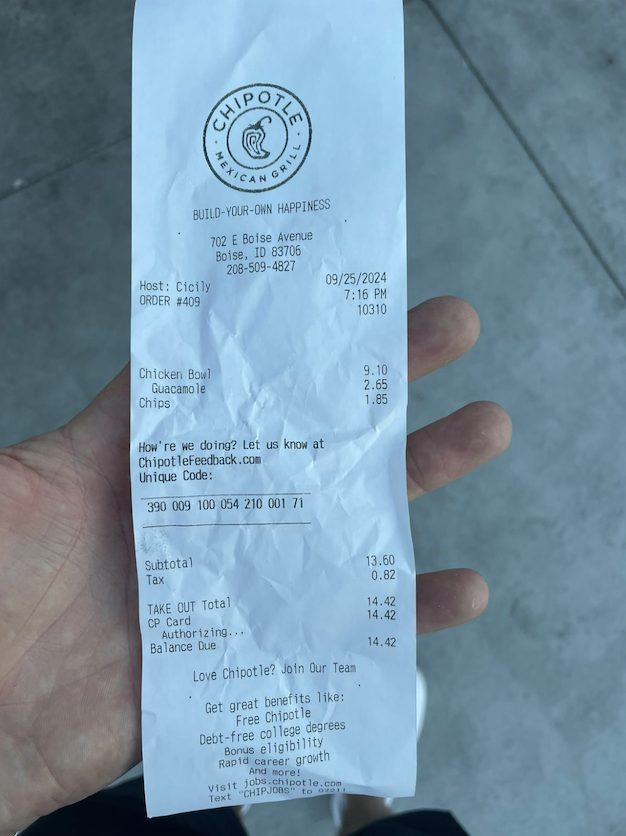
The scanned receipt behind the response below. The request uploaded this receipt as a multipart/form-data file. The simple form returns the compact core-field schema — totals, tax, date, and merchant details.
Important Notes
- Optional properties may be omitted when a value is not produced for the document.
- Need line items, per-field metadata, or feature envelopes? Use the verbose form.
Example JSON Response
{
  "totalAmount": {
    "data": 14.42,
    "confidenceLevel": 0.9199999999999999
  },
  "taxAmount": {
    "data": 0.82,
    "confidenceLevel": 0.9199999999999999
  },
  "confidenceLevel": 0.898,
  "date": {
    "data": "2024-09-25T12:00:00.000Z",
    "confidenceLevel": 0.9199999999999999
  },
  "merchantName": {
    "data": "CHIPOTLE MEXICAN GRILL",
    "confidenceLevel": 0.8100000000000002
  },
  "merchantAddress": {
    "data": "702 E Boise Ave, Boise, Idaho, 83706",
    "confidenceLevel": 0.99
  },
  "merchantCity": {
    "data": "Boise",
    "confidenceLevel": 0.99
  },
  "merchantState": {
    "data": "Ada County, Idaho",
    "confidenceLevel": 0.99
  },
  "merchantCountryCode": {
    "data": "US",
    "confidenceLevel": 0.99
  },
  "merchantPostalCode": {
    "data": "83706",
    "confidenceLevel": 0.99
  },
  "merchantTypes": {
    "confidenceLevel": 0
  }
}
Understand the Response
- Understanding Your Results — how to read the response, field by field.
- Data Fields That Taggun Extracts — definitions for every extracted field.